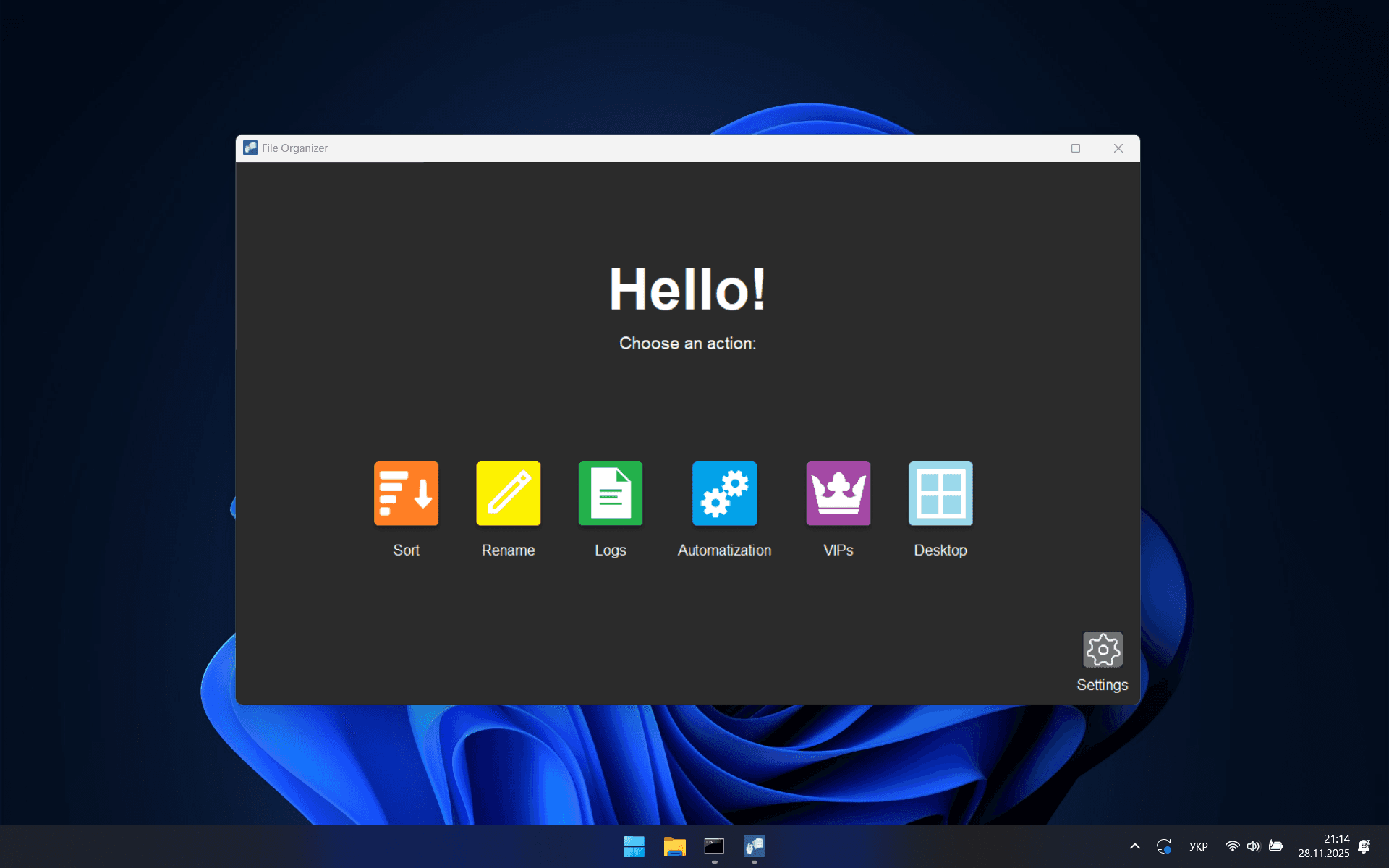
FILE
ORGANIZER
The smartest way to handle your files. Stop organizing manually and let the system do the work for you.
How it works?
How it works?
SORT MENU
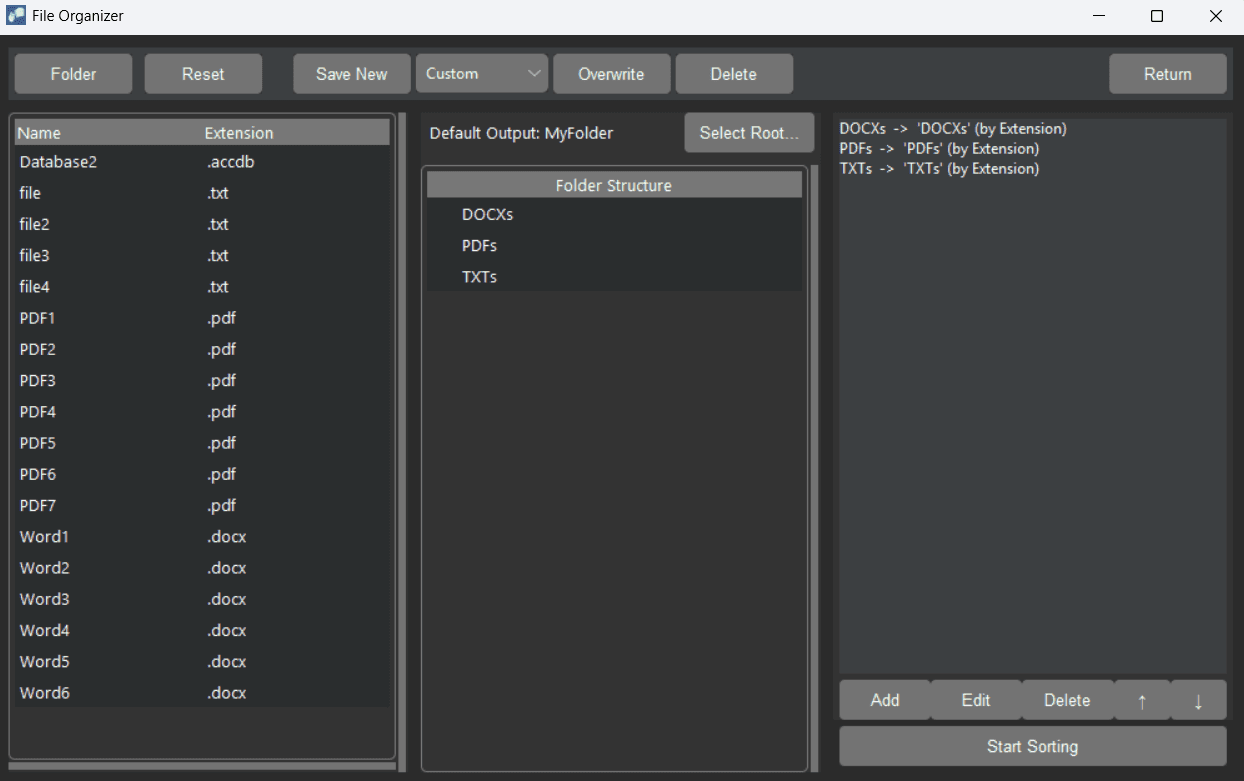
Automatically distribute your files into a custom subfolder structure. The system sorts the selected folder based on your pre-set hierarchy and specific matching rules involving Name, Extension, or Size (MB). You can easily add, modify, or delete these sorting rules at any time. Additionally, you can save your customized hierarchy and settings into separate profiles for easy access.
Automatically distribute your files into a custom subfolder structure. The system sorts the selected folder based on your pre-set hierarchy and specific matching rules involving Name, Extension, or Size (MB). You can easily add, modify, or delete these sorting rules at any time. Additionally, you can save your customized hierarchy and settings into separate profiles for easy access.
RENAME MENU
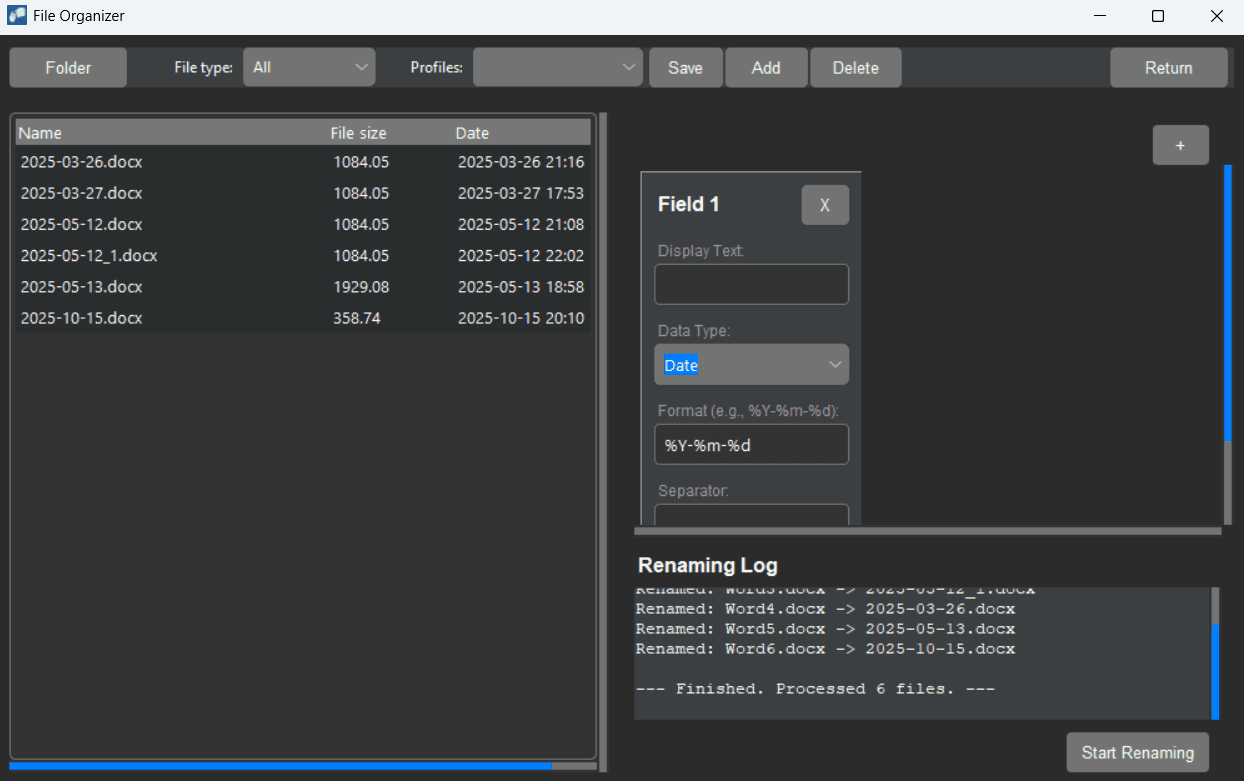
Perform bulk renaming of all files in a selected folder. You can construct dynamic filenames by combining multiple fields joined by your preferred separators. For each field, you select exactly one source: Text, Date, Size, or a Metadata Key. The tool offers precise control, allowing you to define specific formats and determine how to handle missing attributes: by skipping the file, using a fallback value, or inserting an empty string. You can save your configuration as a profile for future use.
Perform bulk renaming of all files in a selected folder. You can construct dynamic filenames by combining multiple fields joined by your preferred separators. For each field, you select exactly one source: Text, Date, Size, or a Metadata Key. The tool offers precise control, allowing you to define specific formats and determine how to handle missing attributes: by skipping the file, using a fallback value, or inserting an empty string. You can save your configuration as a profile for future use.
LOGS MENU
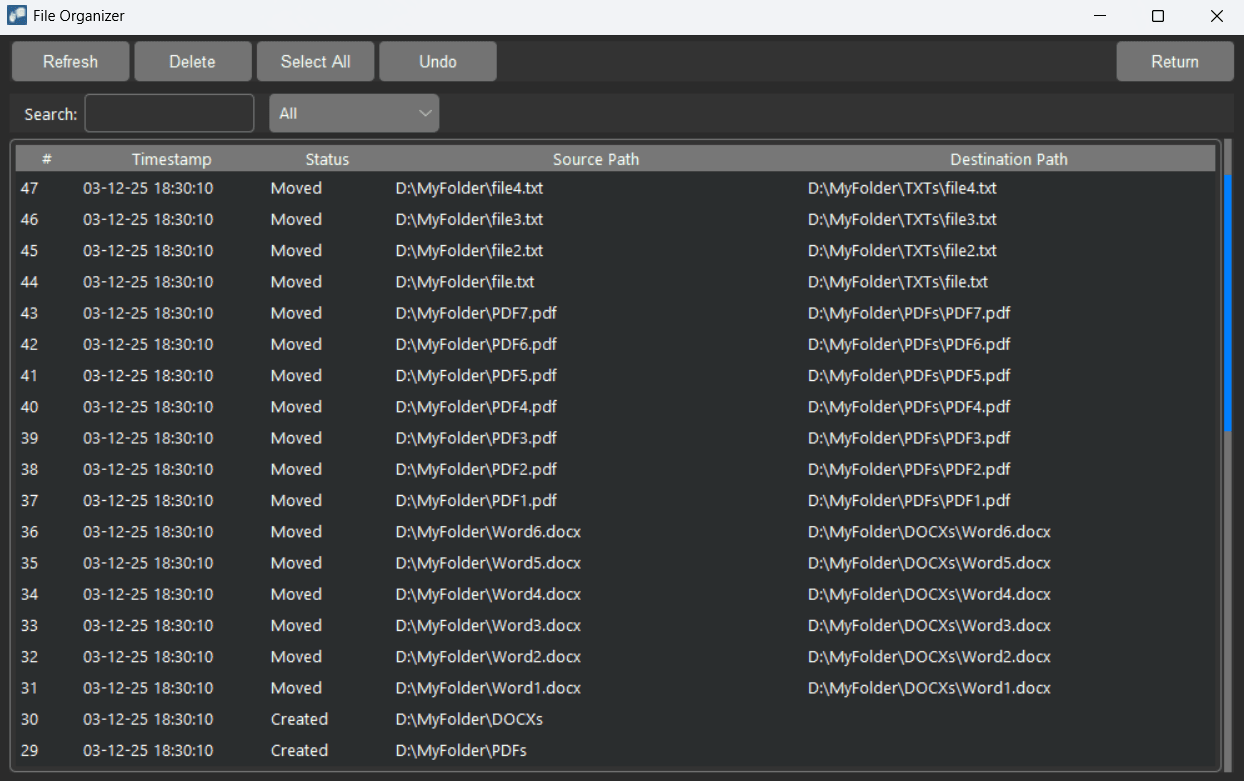
Monitor file system activity in real-time by leveraging the efficiency of the disk's USN Journal. The system tracks four key events: deleted, created, renamed, and moved. You can easily revert changes by undoing single or multiple actions. Additionally, the tool includes a suppression feature to mute folders generating "Event Storms" (rapid bursts of activity occurring in less than 1 second).
Monitor file system activity in real-time by leveraging the efficiency of the disk's USN Journal. The system tracks four key events: deleted, created, renamed, and moved. You can easily revert changes by undoing single or multiple actions. Additionally, the tool includes a suppression feature to mute folders generating "Event Storms" (rapid bursts of activity occurring in less than 1 second).
AUTOMATIZATION MENU
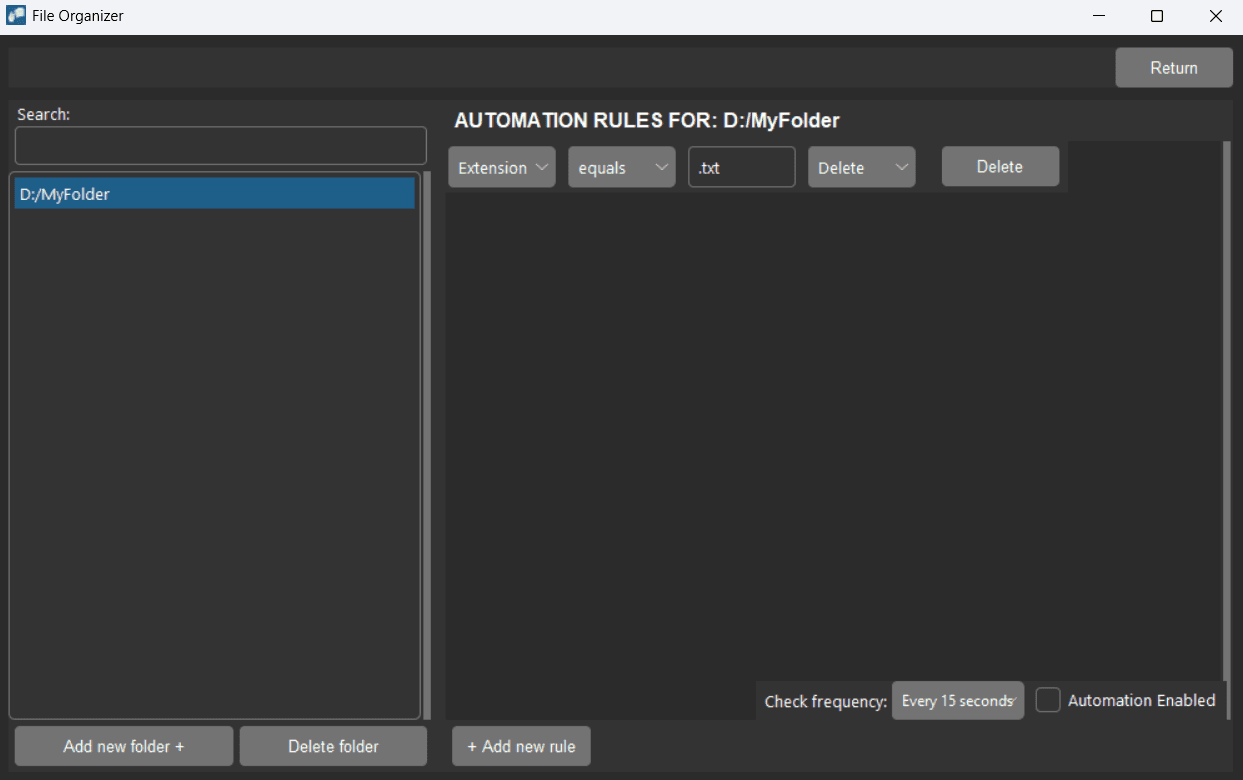
Configure targeted automation for specific folders. You can define multiple independent actions to manage folder contents based on precise criteria. Build rules by selecting an attribute (Extension, Name, Size, or Created (Days)), applying an operator, and setting a target value to trigger a Move, Rename, or Delete operation. You have full control over the monitoring schedule, with scan frequencies ranging from every 15 seconds to once a day.
Configure targeted automation for specific folders. You can define multiple independent actions to manage folder contents based on precise criteria. Build rules by selecting an attribute (Extension, Name, Size, or Created (Days)), applying an operator, and setting a target value to trigger a Move, Rename, or Delete operation. You have full control over the monitoring schedule, with scan frequencies ranging from every 15 seconds to once a day.
VIPs MENU
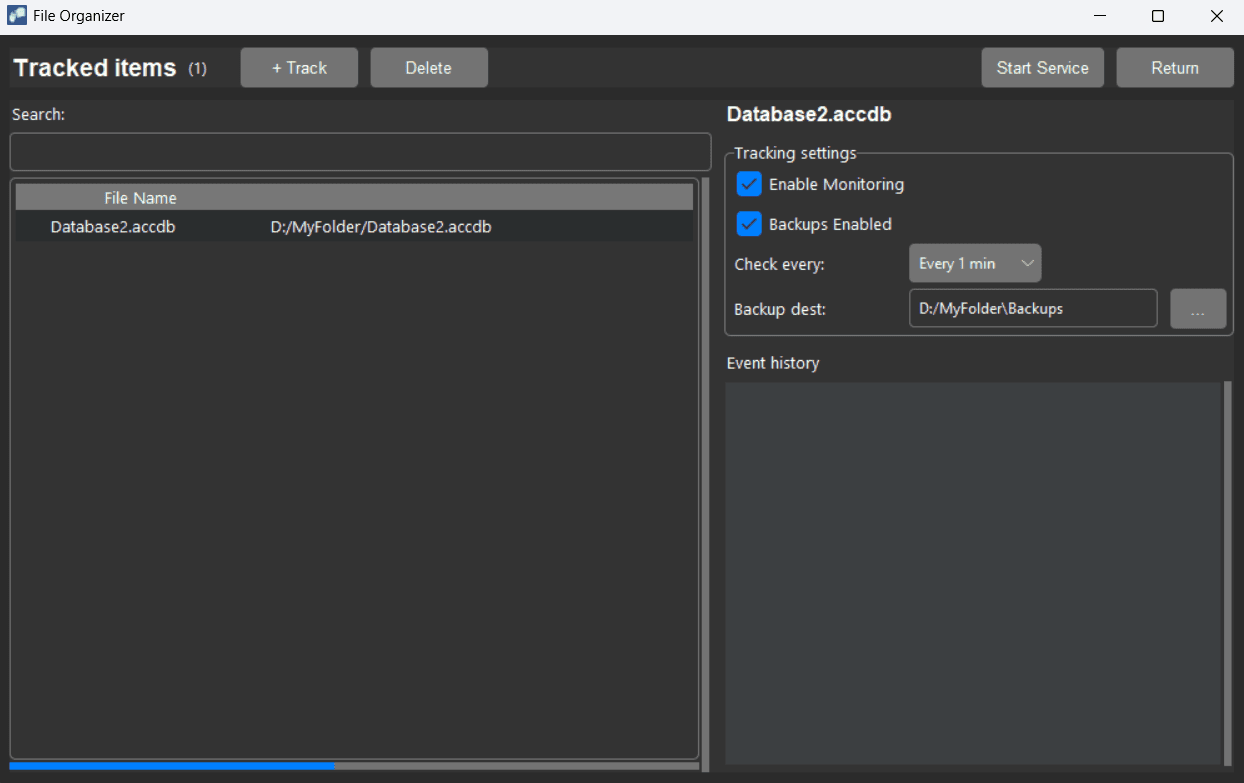
Select specific files to track individually. For every modification detected, the system generates a sequential log entry in the interface alerting you to the change. Simultaneously, it automatically saves a backup copy to a designated folder. You have full control over the check frequency, with intervals ranging from 5 seconds to 24 hours.
Select specific files to track individually. For every modification detected, the system generates a sequential log entry in the interface alerting you to the change. Simultaneously, it automatically saves a backup copy to a designated folder. You have full control over the check frequency, with intervals ranging from 5 seconds to 24 hours.
DESKTOP MENU
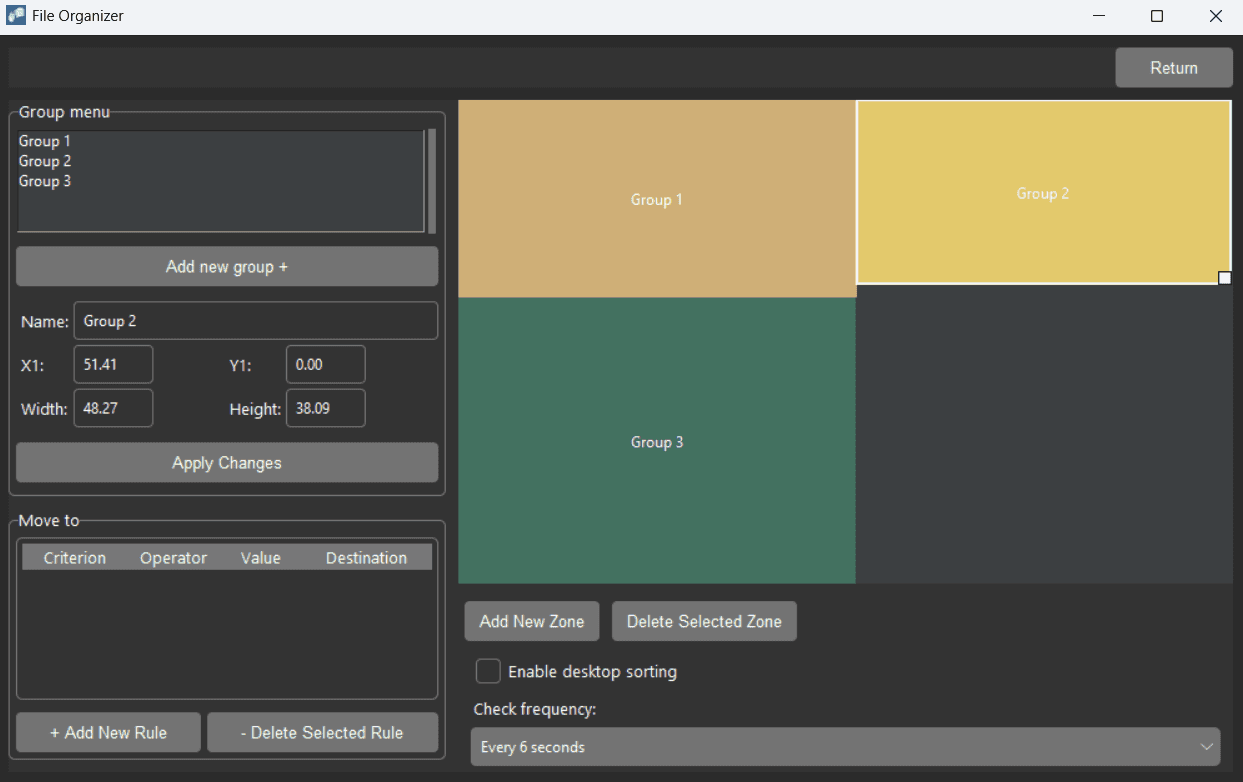
Define desktop zones by visually drawing them or entering coordinates. Configure rules to filter files based on a single attribute – Name, Extension, Size, or Date – and automatically move them to a designated Zone or absolute path. You have full control over the check frequency, with intervals ranging from 6 seconds to 12 hours.
Define desktop zones by visually drawing them or entering coordinates. Configure rules to filter files based on a single attribute – Name, Extension, Size, or Date – and automatically move them to a designated Zone or absolute path. You have full control over the check frequency, with intervals ranging from 6 seconds to 12 hours.
Don't take our word for it
Don't take our word for it
An incredibly robust tool that saves me hours of manual sorting every week. As a designer, my desktop used to be cluttered with hundreds of temporary screenshots and assets. Now, FileOrganizer instantly detects these files and uses smart automatizations to move them into project-specific folders. The setup was effortless, and the system stability is rock-solid. I also love the bulk rename feature—it automatically formats my file names so they are consistent and easy to find later.

Marcus Thorne
Graphic Designer
Managing thousands of raw images used to be a nightmare, but FileOrganizer changed that completely. The automation features instantly rename and move my files into date-sorted folders as soon as I import them. It keeps my desktop spotless and saves me hours of editing time.
The interface is clean and intuitive, allowing me to set up complex rules in seconds. It is a reliable 'set-it-and-forget-it' solution that I can't imagine working without.
Liam Harper
Professional Photographer
This software solution has truly exceeded my expectations. The system operates with exceptional stability, free from any technical glitches or delays, which is a rarity these days. I am particularly impressed by the thoughtful design of the interface; everything is organized so logically that the adaptation process took just a few minutes. It is the ideal tool for anyone looking to boost productivity and eliminate unnecessary routine. A solution that delivers real results. I definitely recommend it.
James Smith
Programmer
I tried many different solutions to optimize my workflow, but this is by far the most intuitive. It seamlessly integrates into my daily routine and works quietly in the background, keeping everything in order. The application is fast, responsive, and doesn't get in the way. It gives me a sense of control over my files that I never had before. A truly polished product.
Chloe Vance
Freelance Video Editor
I have used dozens of productivity tools over the last decade, but this one stands out immediately. It is incredibly smart and intuitive, running quietly in the background while I focus on growing my business. I have noticed a significant drop in my daily stress levels simply because I am not constantly fighting digital entropy. The interface is professional, the performance is snappy, and the results are consistent. It is truly an investment in your own sanity.
James Sterling
Startup Founder
I used to spend far too much time trying to keep things in order, but this application solved that problem instantly. It organizes everything so logically that I never have to worry about clutter building up again. The user interface is incredibly polished and straightforward—you don't need to be a tech expert to master it. It provides a level of order and peace of mind that is honestly priceless.
Michael Ross
Senior Project Manager
Support the project
Support the project
Thanks! Every contribution helps us reach new heights.
Thanks! Every contribution helps us reach new heights.
Frequently Asked Questions
Frequently Asked Questions
Is my data safe?
Is my data safe?
Is my data safe?
Does FileOrganizer affect system performance?
Does FileOrganizer affect system performance?
Does FileOrganizer affect system performance?
Which operating systems are supported?
Which operating systems are supported?
Which operating systems are supported?
Do I need an internet connection to run the app?
Do I need an internet connection to run the app?
Do I need an internet connection to run the app?
How can I report a bug or suggest a feature?
How can I report a bug or suggest a feature?
How can I report a bug or suggest a feature?

FILE ORGANIZER
Product
Watch demo
What's Next?
About the Dev
Resources
Contact Support
Developer Blog
Tutorials & Guides
Policies
Privacy Policy
Terms of Use